We all have that one person on Instagram. Maybe it’s a coworker who posts 15 Stories a day, an overly political relative, or an old friend you don’t want to offend. You are tired of seeing their content clog up your feed, but hitting the "Unfollow" button would cause unnecessary real-life drama.
Enter Instagram's best-kept secret for protecting your peace: The Mute Feature.
What Happens When You Mute Someone?
Muting is the polite, stealthy alternative to unfollowing or blocking. When you mute an account:
- Their posts will no longer appear in your main feed.
- Their Stories will be pushed to the very end of your Story queue and will not auto-play.
- They will NOT be notified. They will have absolutely no idea that you muted them.
- You will still be following each other, and you can still visit their profile to view their content whenever you actively choose to.
How to Mute Instagram Posts and Stories (Step-by-Step)
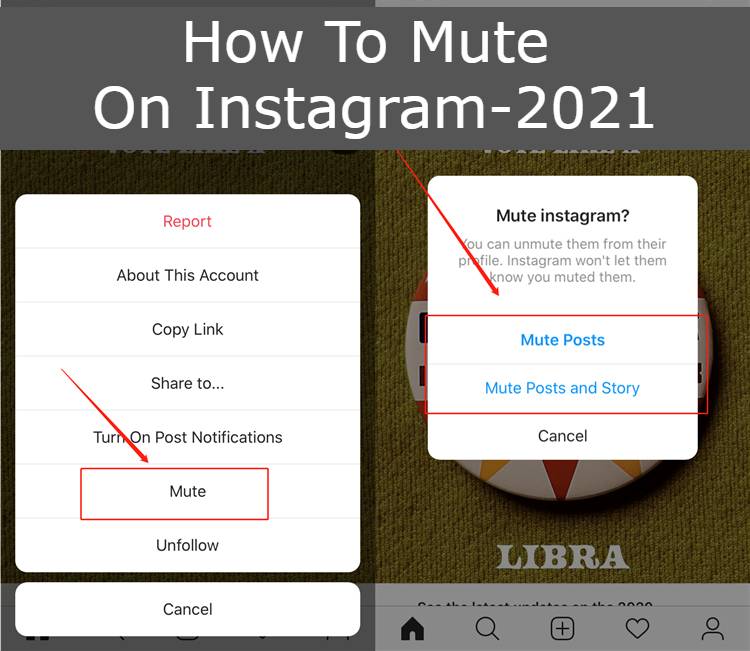
You can mute someone directly from your feed or from their profile page. Here is the easiest way to do it:
- Go to their Profile: Search for the user you want to mute and go to their main Instagram page.
- Tap the "Following" Button: Right under their bio, tap the button that says Following with the little downward arrow.
- Select "Mute": A menu will pop up from the bottom of the screen. Tap on Mute.
- Choose Your Preferences: You will see toggle switches for Posts, Stories, and Notes. Toggle the switches on (they will turn blue) for the content you no longer want to see.
Alternatively, if you see their Story at the top of your feed, simply press and hold their Story bubble and select "Mute" from the pop-up menu.
How to Unmute an Account Later
Did you change your mind? Reversing the process is just as easy. Simply visit their profile again, tap the "Following" button, select "Mute," and toggle the switches back off. Their content will immediately start showing up in your daily feed and Story queue again.
Curating your feed is essential for a healthy social media experience. Don't be afraid to use the mute button to keep your Instagram timeline inspiring, relevant, and drama-free.


