Curating Your Feed Without the Real-Life Drama
We all have that one person on Instagram: a coworker who posts 15 Stories a day, an overly political relative, or an old acquaintance. You are tired of seeing their content clog up your feed, but hitting the "Unfollow" button would cause unnecessary real-life drama. Enter Instagram's best-kept secret for protecting your peace: The Mute Feature.
Does Instagram Notify When You Mute Someone?
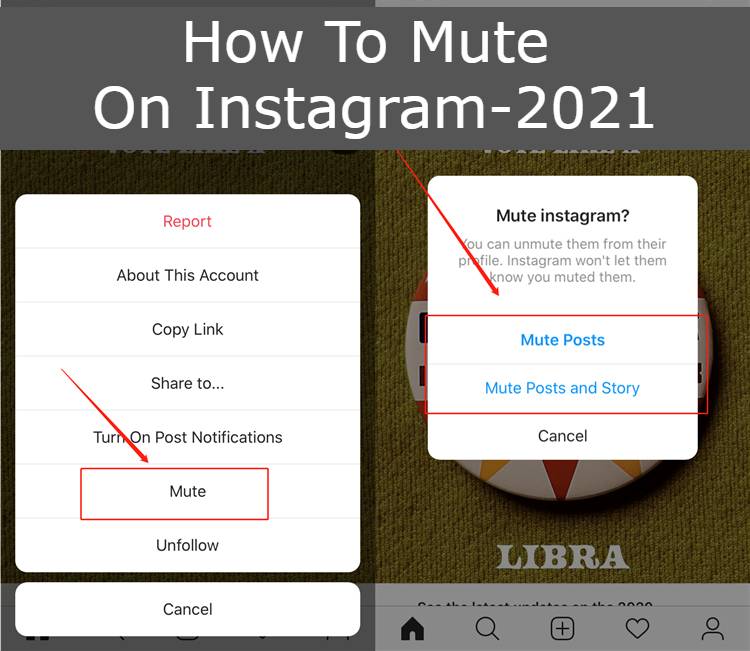
Let us answer the most important question immediately: No. Instagram does not notify the other person when you mute them. They will have absolutely no idea. You will still be on their followers list, and they can still view your profile normally.
How to Mute Instagram Posts and Stories (Step-by-Step)
You can mute someone's content directly from their profile page. Here is the stealthiest way to do it:
- Search for the user you want to mute and go to their main Instagram profile.
- Right under their bio, tap the button that says Following (it has a small downward arrow).
- A menu will pop up from the bottom. Tap on Mute.
- You will see toggle switches for Posts, Stories, and Notes. Toggle the switches ON (they will turn blue) for the content you no longer want to see.
Alternative Method: If you see their Story bubble at the top of your home feed, simply press and hold their profile picture and select "Mute" from the quick menu.
How to Unmute an Account Later
If you change your mind, reversing the process is just as easy. Visit their profile again, tap the "Following" button, select "Mute," and toggle the switches back off. Their content will immediately start showing up in your daily timeline again.


